


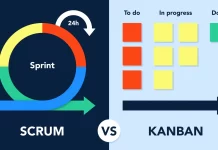






In Scrum Metodology, a Sprint is a time-boxed period (usually 1 to 4 weeks) during which a Scrum team works to complete a set amount of work. The goal of a Sprint is to deliver a potentially shippable product increment, meaning a version of the product that is fully functional and could be released to customers if desired.
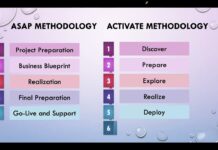
SAP Activate is a methodology that combines elements of Agile and Waterfall approaches. SAP Activate Methodology uses an agile release schedule in order to reflect ongoing feedback and learnings, where the main goals are customer satisfaction and a successful implementation. In SAP Activate, Sprints are time-boxed periods used to deliver incremental value throughout the project phases, particularly during the Explore, Realize, and Deploy phases, where flexibility and adaptability are essential. They help teams work in short, iterative cycles to deliver incremental value and gather feedback.
The duration of Sprints in SAP Activate typically ranges from 2 to 4 weeks, depending on the project’s complexity, team size, and specific goals. The standard industry practice is to use 2-week Sprints, but this can be adjusted based on the project’s needs.
Here’s a breakdown of where and how you can use sprints in the SAP Activate methodology, along with the activities involved in each phase.
1. Explore Phase
The Explore phase is focused on gathering requirements, defining business processes, and configuring the initial solution. While the Explore phase is generally a preparatory phase, sprints are still employed for certain activities to iterate and validate the system’s design and setup.
Sprints in the Explore Phase:
- Activities:
- Initial Prototyping: During the Design part of the Explore phase, sprints can be used to develop early prototypes or mockups. These prototypes help demonstrate the basic functionality of the system and provide stakeholders with something tangible to review and offer feedback on.
- Fit-Gap Analysis: Use sprints to review and analyze how SAP Best Practices fit with the business requirements, and identify gaps that need to be addressed. Sprints help to handle these gaps iteratively, reviewing business requirements against standard SAP processes.
- User Story Mapping: In Agile, user stories are used to define features or functionalities. Sprints can be employed to create user stories for key processes or workflows, and then use them to plan out the next steps in the project.
- Business Process Validation: Sprints help confirm that business processes and requirements are well-understood by involving key stakeholders in validation sessions.
Outcome of Sprints in the Explore Phase:
- Business processes are refined, and solution designs are validated early in the project lifecycle.
- Provides early feedback and validation to ensure the system aligns with business goals and requirements.
2. Realize Phase
The Realize phase is when the system is actually configured, developed, and tested. This is where sprints become the core methodology for executing the project. In this phase, sprints are used to deliver the functional configurations, custom developments, and testing cycles that are required.
Sprints in the Realize Phase:
- Activities:
- System Configuration: During each sprint, SAP Activate teams focus on configuring specific modules or features of the SAP solution. For example, one sprint could focus on configuring finance processes, another on supply chain processes, and so on.
- Custom Development: If there are custom developments required (such as building custom apps or features), sprints can be used to develop these iteratively. This helps ensure that the customizations meet business needs and are aligned with the solution architecture.
- Integration Testing: Each sprint includes integration testing to ensure that newly configured processes or custom developments work together seamlessly. This can be unit testing (individual process steps) or end-to-end testing across modules.
- User Acceptance Testing (UAT): After configuring and developing a set of features, sprints also include sessions for UAT. During these sessions, business users can interact with the system and provide feedback on whether the solution meets their needs.
- Prototyping & Refining: In each sprint, further refinement of the solution occurs. You can test additional process changes or new ideas based on feedback gathered from users and stakeholders in previous sprints.
Outcome of Sprints in the Realize Phase:
- The solution is incrementally built and tested throughout the phase, leading to early identification and resolution of issues.
- Ensures that customizations are developed and validated step-by-step.
- Allows the team to gather continuous feedback from business stakeholders and end-users.
3. Deploy Phase
In the Deploy phase, the focus is on data migration, user training, and go-live preparation. While the main work of the project has already been done, sprints are still used for finalizing the solution and ensuring it is ready for production.
Sprints in the Deploy Phase:
- Activities:
- Data Migration: Sprints in the Deploy phase can focus on migrating data from legacy systems to SAP. This includes transforming and mapping data to the new system and testing its accuracy and completeness.
- End-User Training: Training is often structured in sprints to ensure that the end-users are ready to use the system when it goes live. This includes developing training materials, conducting training sessions, and gathering feedback to ensure effectiveness.
- Cutover Planning: The final preparations for going live are managed in sprints to ensure the system is ready for production. This includes validating the cutover plan, conducting final testing in the production environment, and ensuring all systems are in sync.
- Post-Go-Live Support: After the system is live, sprints are used to provide post-go-live support. Teams continue to fix issues, make improvements, and stabilize the system after it’s been deployed.
Outcome of Sprints in the Deploy Phase:
- Helps ensure a smooth transition to production, with ongoing training and support for users.
- Allows for post-go-live adjustments, fixes, and improvements based on initial feedback from users.
- Provides a final opportunity to address any outstanding issues before the system is fully live.
Overall Benefits of Sprints in SAP Activate
- Increased Transparency: With sprints, progress is tracked regularly, allowing for frequent reviews and adjustments based on real-time feedback.
- Early Validation: Frequent reviews ensure the solution aligns with business goals.
- Risk Mitigation: Potential issues or bottlenecks are identified early in each sprint, helping to mitigate risks and keep the project on track.
- Flexibility: As the project progresses, the ability to adapt to new requirements, changes in scope, or unforeseen challenges is much easier with the iterative nature of sprints.
- Continuous Stakeholder Involvement: Sprints help engage stakeholders consistently, ensuring that the solution aligns with their needs and expectations at every stage.
Conclusion
In SAP Activate, sprints are used throughout the Explore, Realize, and Deploy phases to ensure incremental delivery, collaboration, and continuous improvement. Whether it’s for prototyping, configuring, testing, or training, sprints provide the flexibility to adapt to changes, resolve issues quickly, and deliver value in each iteration. This approach allows SAP Activate to be dynamic and responsive to business needs, ensuring a smoother and more successful implementation of SAP solutions.